Tuesday, June 6, 2023

6 ChatGPT Apps to Analyze and Chat With Your Documents and PDFs

6 ChatGPT Apps to Analyze and Chat With Your Documents and PDFs

makeuseof.com

6 ChatGPT Apps to Analyze and Chat With Your Documents and PDFs

Mihir Patkar

These apps use AI to read your PDFs and documents and then ask queries and get answers via ChatGPT.

ChatGPT has already wowed the world with how it takes information from the internet and condenses it into succinct answers for your queries. Not many people know that you can also ask ChatGPT to read your PDFs and chat about their contents. But if that's your objective, then these apps offer better options, from increased database sizes to creating chatbots from multiple documents.

1. Unriddle (Web, Chrome): Most Powerful Way to Chat With Your Documents

Unriddle is the best app to analyze your documents and then talk with them using ChatGPT, but the free tier is severely limited
  • File Formats Supported: PDF, DOC, URL
  • Page Limit: 120 pages (Free) | 4,000 pages (Paid)
  • File Size Limit: No Information Available
  • Max Files: No information available
  • Chat Query Limit: 5 / Month (Free) | 250 / Month (Paid)

Unriddle's free version is severely limited, allowing only five actions in a whole month. The first of those five is when you create a bot to analyze a file, so it'll be only four questions or messages after that. If you plan to use this app, you'll need to upgrade to the pro ($20 / month) or premium ($50 / month) plan very quickly.

But given Unriddle's performance, it's well worth it. The app uses GPT-4 and is built purely to analyze documents to give answers only from the material given to that bot. Unriddle claims it can handle around 500,000 words, which is far more than ChatGPT's capacity of 4,000 words.

Chrome users can also download the Unriddle Summarize extension to read any long article easily. The AI will analyze and summarize articles in a jiffy, and you can also ask follow-up questions to the bot without leaving the page.

Download: Unriddle Summarize for Chrome (Free)

2. Chatterdocs (Web): Create Chatbots Sourcing From Multiple Documents

Chatterdocs can analyze multiple documents at the same time while you chat with a bot and ask questions like ChatGPT
  • File Formats Supported: PDF, DOC, TXT, JPEG, PNG
  • Page Limit: No Information Available
  • File Size Limit: No Information Available
  • Max Files: 3 / Bot (Free) | 100 / Bot (Paid)
  • Chat Query Limit: 50 / Month (Free) | 1000 / Month (Paid)

Chatterdocs lets registered users create multiple chatbots that can take in information from several sources and then be embedded in websites or used as landing pages. Essentially, you're creating a chatbot by simply uploading your materials or importing a website.

You can add up to three files for a bot in the free version and then choose which of those sources you want to keep active. Chatterdocs uses ChatGPT to understand queries and give answers. In our tests, we found that you need to be precise in your chat prompts to get the right information.

Unregistered users can also use Chatterdocs to analyze PDF files. It's a free tool to see how much Chatterdocs can do.

Klavier is a completely free way to have AI scan your documents and then use ChatGPT to find information within
  • File Formats Supported: PDF, DOCX, TXT, HTML
  • Page Limit: No Information Available
  • File Size Limit: No Information Available
  • Max Files: No Information Available
  • Chat Query Limit: No Information Available

Unlike all other such apps, Klavier doesn't seem to have any restrictions on the number of questions you ask and is completely free. That alone makes it worth using over several other alternatives, especially if you plan to ask many queries. Klavier can also analyze web pages to summarize articles.

However, Klavier was definitely slower than other apps. And while it uses the same GPT AI that others are using, the answers weren't as in-depth as what you get in Unriddle. But given it's completely free and unlimited, that's hardly a complaint.

Currently, you cannot create an account on Klavier to store analyzed files. In fact, you can only work with one source material at a time and will lose any progress if you add a new source for Klavier to analyze.

4. LXI.ai (Web): Chat With Your Documents and Pay Per Usage

LXI.ai has an innovative system to chat with your documents and pay only per your usage, not lumpsum tiers
  • File Formats Supported: PDF, DOCX, TXT, URL
  • Page Limit: Unlimited
  • File Size Limit: 15MB (Free Trial) | Unlimited (Paid)
  • Max Files: Unlimited
  • Chat Query Limit: 1,000 Total (Free Trial) | Unlimited (Paid)

LXI isn't a free app. After the 14-day trial period, you'll need to pay. But it's quite interesting that you pay according to your usage, not by preset plans. It costs $0.1 per MB per month for the amount of data you have uploaded. And every question you ask costs $0.0025, which you can avoid if you have your own OpenAI API key. So you have control over the actual price you'll pay.

The chatbot works with all your documents at the same time, so you'll need to learn to phrase ChatGPT prompts effectively to get the answers you need. It's also context-unaware, meaning each question is treated as a separate query without considering the conversation before it.

5. Docalysis (Web): Best App to Have ChatGPT Conversations With PDFs

Docalysis provides one of the most impressive ChatGPT bots for your PDF documents, and having the PDF open alongside is a bonus
  • File Formats Supported: PDF
  • Page Limit: 150 pages (Free) | 1500 pages (Paid)
  • File Size Limit: 5MB (Free) | 50MB (Paid)
  • Max Files: 600 pages/month (Free) | 8,000 pages/month (Paid)
  • Chat Query Limit: 50 / month (Free) | 1,500 / month (Paid)

Docalysis encrypts and stores your PDFs on a cloud server and analyzes them with its own tech. Open a file to show the file contents on the left and a chat window on the right. The app uses ChatGPT to understand and answer your queries based on the information Docalysis feeds it.

You can only work with one document at a time, with no option of querying Docalysis about multiple documents together. The chatbot remembers the context of a current conversation but won't remember previous sessions once you close the window. You can also share a document with others, and they'll be able to then ask questions in the chatbot.

In our tests, we found Docalysis to be one of the best at analyzing documents and providing relevant answers. It understood simple chat prompts, was context-aware in a conversation, and the ability to see the file alongside was a great help.

6. ChatPDF (Web): Use ChatGPT 3.5 to Query PDF Files

ChatPDF is a simple way to run ChatGPT on your PDF documents and chat with a bot
  • File Formats Supported: PDF
  • Page Limit: 120 pages (Free) | 2,000 pages (Paid)
  • File Size Limit: 10MB (Free) | 32MB (Paid)
  • Max Files: 3 / Day (Free) | 50 / Day (Paid)
  • Chat Query Limit: 50 / Day (Free) | 1000 / Day (Paid)

ChatPDF is one of the coolest new apps to work with PDF files, and performs shockingly well for all text. It had trouble reading images and data from tables in our tests, where we uploaded files from our drive as well as direct URLs. The developers say that while they currently use ChatGPT 3.5, they are looking into how to incorporate the newer ChatGPT 4.

Learn Prompts to Make Chat Memory Easier

You'll find that in all these apps, ChatGPT doesn't remember what you talked about after a session is finished. In fact, in some apps, it'll treat each question separately without using the previous query's context. To get around this problem, try and learn how to use prompts for ChatGPT in the app you're using. With a little trial and error, you will be able to figure out how to frame a question so that answers use the context of what you've chatted about before.


Thursday, June 1, 2023

How to use Google Bard (2023): A Comprehensive Guide

How to use Google Bard (2023): A Comprehensive Guide

techrepublic.com

How to use Google Bard (2023): A comprehensive guide

Andy Wolber

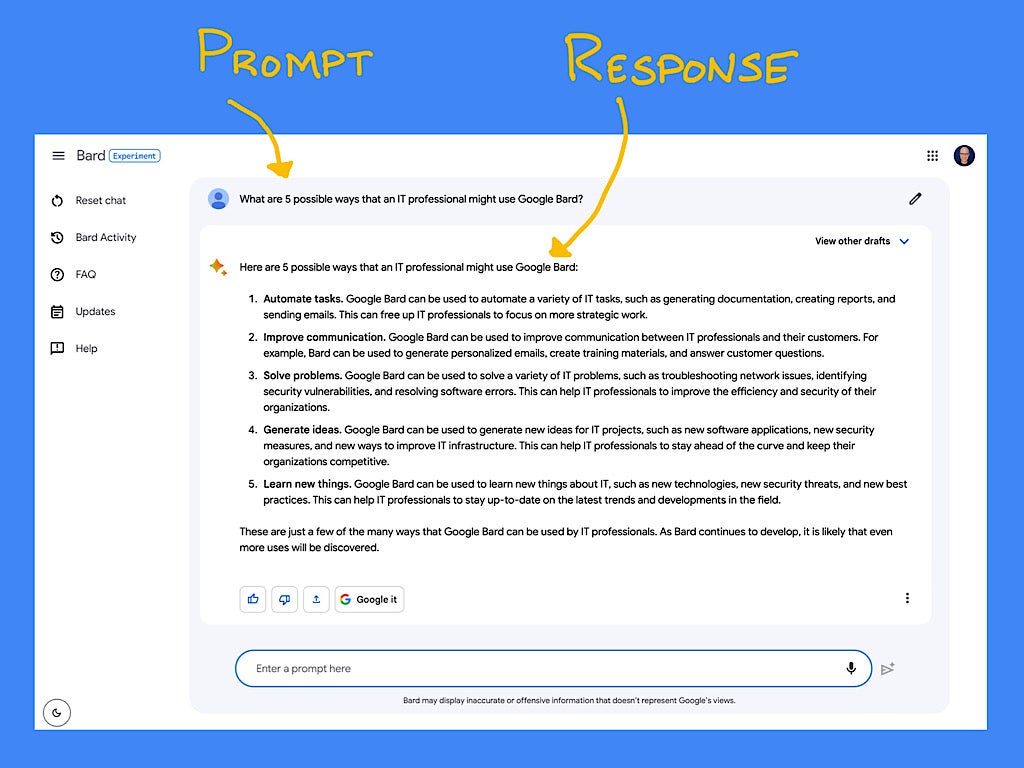
Screenshot showing how to use Google Bard.
Illustration: Andy Wolber/TechRepublic

Bard is Google’s public entry into the highly competitive field of artificial intelligence chatbots, which also includes OpenAPI’s ChatGPT. Google intends Bard to be a “creative and helpful collaborator” that people may chat with using natural language. The following guide covers what you need to know as you chat and explore the capabilities of Google Bard.

Jump to:

What is Google Bard?

Google Bard is an AI chatbot: After you enter a text prompt, Bard generates a response. Importantly, Bard can access the internet to leverage Google search for its responses.

Google launched Bard in early 2023 as an experiment that is based on a conversational large language model.

What is Google Bard used for?

Bard can serve as an AI collaborator to help you explore topics, craft text and code. Anything you might ask a knowledgeable colleague or friend might be a candidate for a prompt in Bard. For example, you could use Bard to:

  • Discover options or brainstorm ideas.
  • Explore a topic or identify related items, books or concepts.
  • Draft an email.
  • Create an outline for a blog post, project, proposal or book.
  • Simplify, rephrase or summarize text.
  • Help create or debug code.

Bard can also streamline a search. For example, consider the task of gathering specifications to select a laptop. With a conventional Google Search, you would search for a product, follow a link, then copy details into a Google Doc. Then you would repeat the process for each additional laptop you wished to compare. With Bard, you could enter a single prompt that asks the system to compare two, three or more laptops and present the information in a table format, then export the response to a Google Doc. What used to be several steps may be reduced to two: Prompt, then export.

Can I use Google Bard for work or school?

Yes, you may use Google Bard for work or school if your organization’s policies and Google Workspace settings allow it.

How to get access to Google Bard

You may use Bard in any modern browser, such as Chrome, Safari, Edge or Firefox; however, you will need to sign in with a Google account to gain access, as follows.

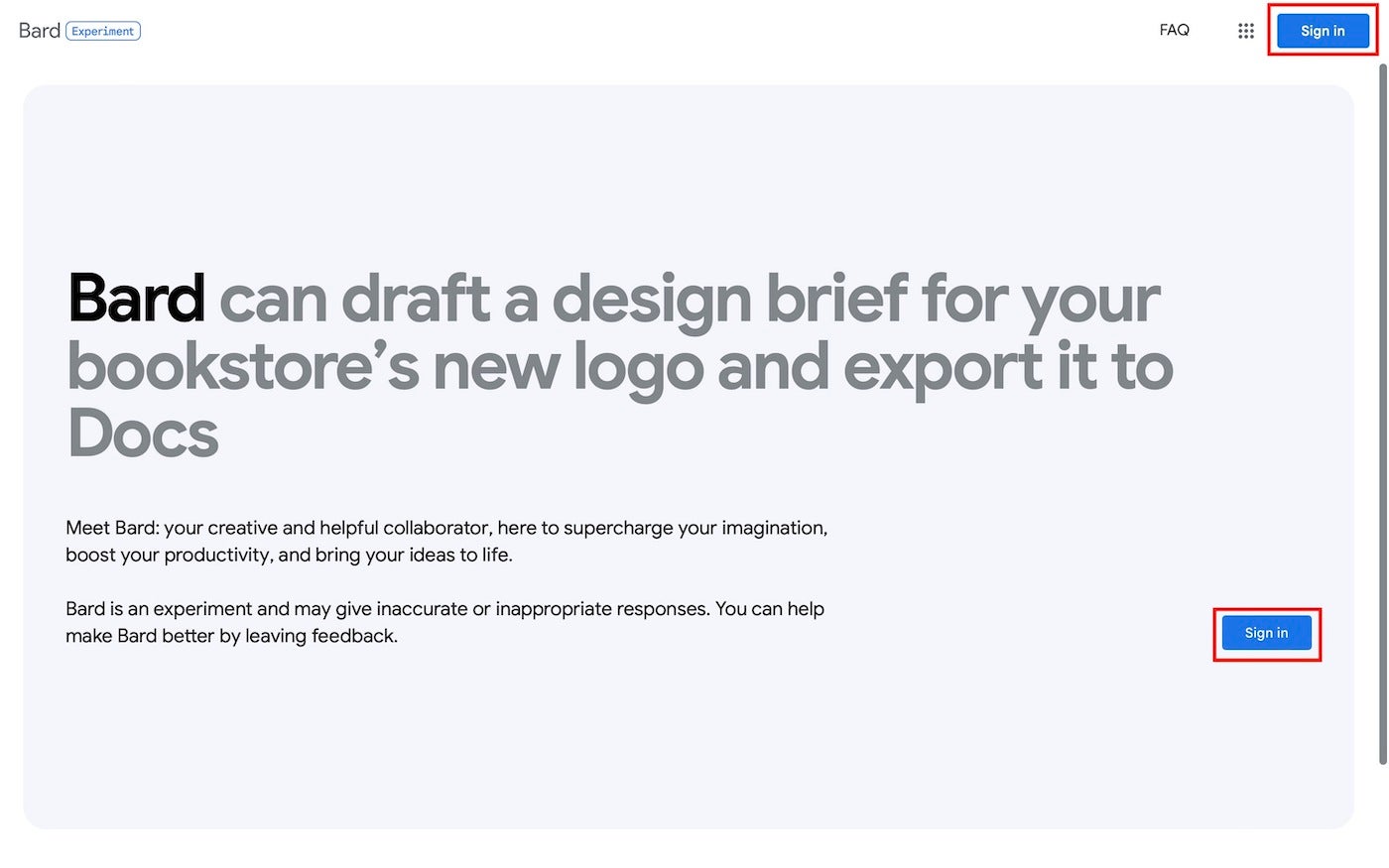
  1. Go to bard.google.com in a browser.
  2. Select Sign In (Figure A).

Figure A

Screenshot of Google Bard Sign In.
Select either Sign In button, then enter your Google account credentials.
  1. Sign in with your Google account.
  2. Select Try Bard (Figure B).

Figure B

The Try Bard button on the Google Bard sign in page outlined in red
Once you’re signed in, select the Try Bard button.
  1. Review the presented terms (Figure C) and, if you agree, accept them.

Figure C

Google Bard terms of service with the I Agree button outlined in red
Review the Terms of Service. Scroll to the bottom, then if you accept the terms, select the I Agree button.
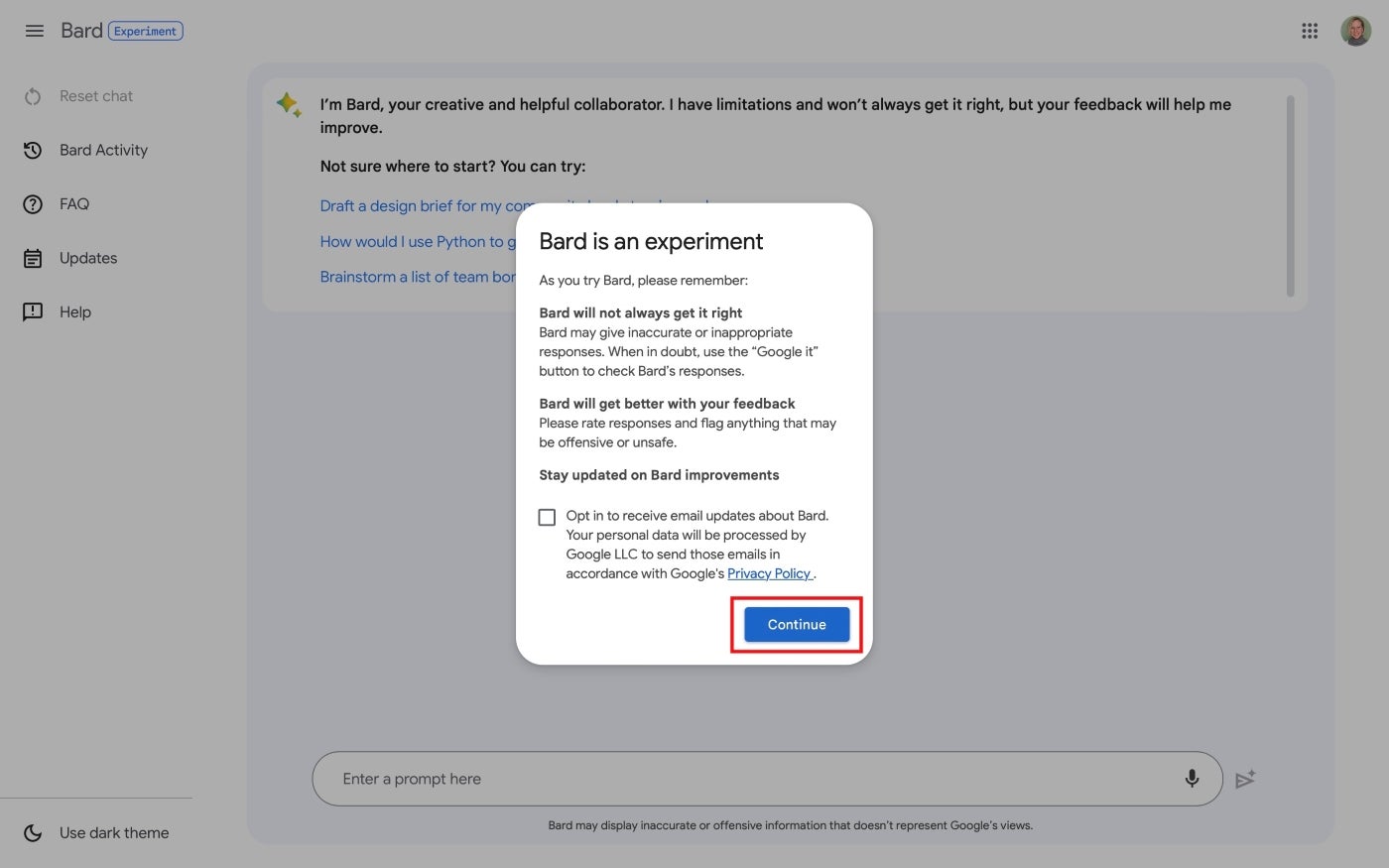
  1. Review the “Bard Is An Experiment” note and, if you wish, opt in to receive email updates about Bard, then select Continue (Figure D).

Figure D

Bard is an experiment pop-up in Google Bard with the Continue button outlined in red.
The system will remind you that Bard is an experiment. Optionally, select To Receive Email Updates About Bard box.
  1. Use Bard by entering a prompt in the box near the bottom of the screen (Figure E).

Figure E

Google Bard interface with an empty text field where users can enter prompts
To use Bard, enter a prompt.

For the easiest access to Bard, you might consider adding Bard as a bookmark or set the site as your browser homepage. Since Bard works in a variety of browsers, fast-access techniques work not only from Chrome, but also from other systems. For example, in Safari on an iPhone from bard.google.com you could select the Share button | Add To Home Screen to place a Bard app link on your phone.

How to use Google Bard

You may access Bard from any mobile or desktop web browser while signed in to a Google account.

  1. Open bard.google.com in a browser.
  2. Enter a prompt, either by typing or selecting the microphone and talking. Press enter (or return) to send the prompt to Bard.
  3. Review Bard’s response.

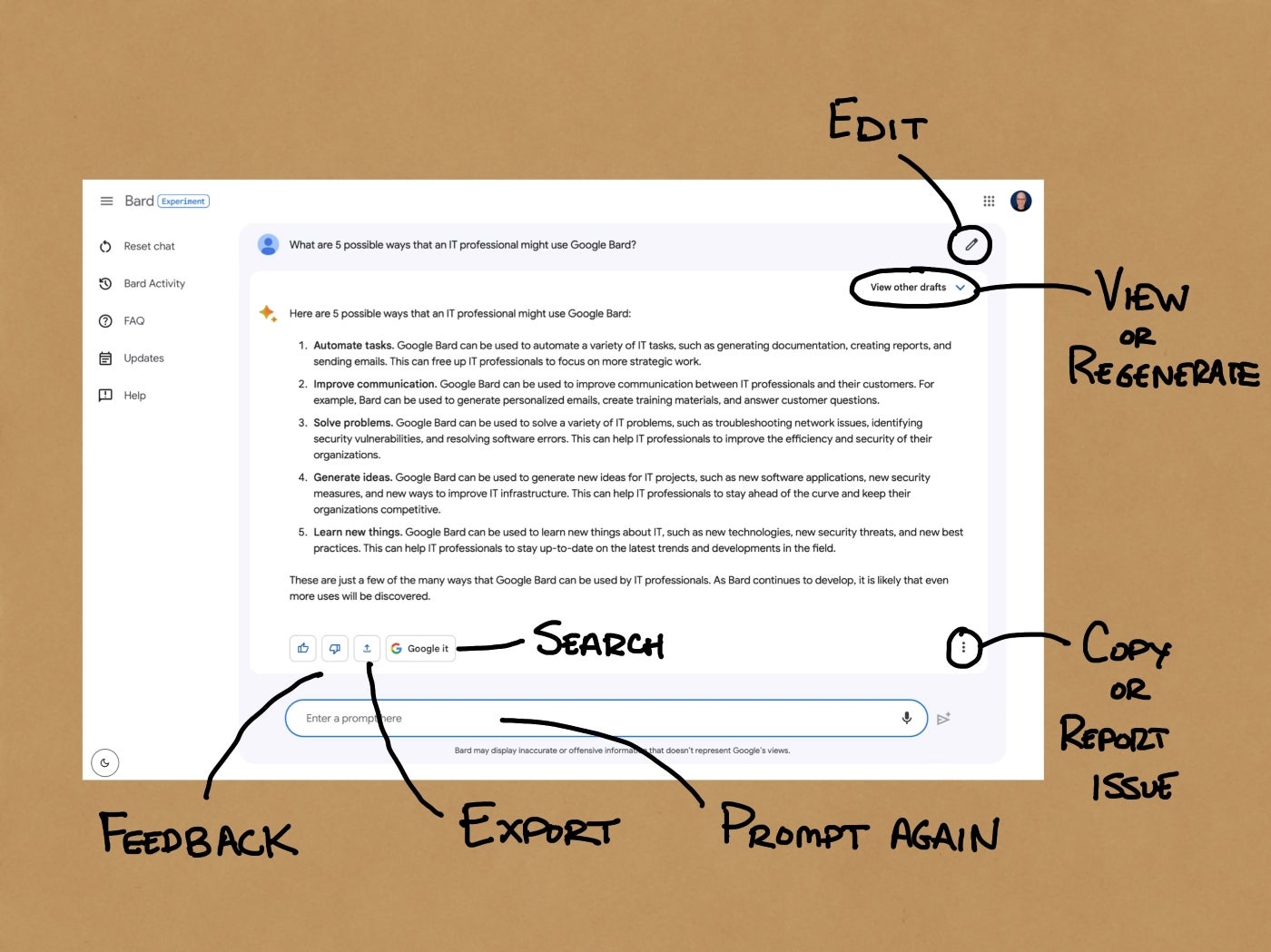
Once Bard provides a response, the system offers a robust set of optional actions (Figure F).

Figure F

Google Bard response with annotations pointing out that users can edit, view or regenerate, search, provide feedback, report, export, or copy the response
You may select from a wide range of options for any Bard response, including the ability to follow-up with an additional prompt.

You may:

  • Edit the prompt text to try a variant prompt.
  • View other drafts to evaluate differently structured responses.
  • Regenerate drafts to seek alternative responses.
  • “Google it” to switch to a standard keyword search query derived from your prompt.
  • Export the response to a new Gmail or a Google Doc.
  • Copy the content to paste into another app.
  • Report a legal issue to signal a significant content concern.
  • Provide feedback with a thumbs up (Good Response) or down (Bad Response) button.
  • Enter another prompt to continue the chat.

Frequently asked questions about Google Bard

How accurate is Google Bard?

As an experiment, Google tries to ensure that Bard responses are accurate, but prominently cautions that “Bard may display inaccurate or offensive information that doesn’t represent Google’s views.” When you use Bard, you should verify the accuracy of any response provided.

How does Google Bard compare to a Google Search?

Google Search provides relevant links in response to keywords. When the system is highly certain that a specific answer is relevant, Google Search may prominently feature the desired information, such as a snippet of content from Wikipedia, a sports score or weather data.

Google Bard provides responses to natural language prompts. Unlike search, where each keyword query returns an answer and list of links, a Bard response may be just the start of a string of interactions in a chat-like format. At any point, you may prompt Bard to expand, clarify, rephrase or regenerate a response.

How does Google Bard compare to ChatGPT?

ChatGPT is a large language model system from OpenAI that offers both free and paid editions. OpenAI and Microsoft have announced a wide range of product integrations and partnerships, including connections between ChatGPT and Microsoft Bing. GPT-4 provided significant performance improvements over earlier editions.

Bard is a large language model system experiment from Google that is free for people to use. Bard relies on current internet information via Google Search.

Google, Microsoft and OpenAI are iterating rapidly to enhance and expand the capabilities of their respective AI systems.

What are the main competitors to Google Bard?

In addition to ChatGPT, alternatives to Google Bard include Microsoft’s new Bing, Perplexity AI, Inflection AI’s Pi and Anthropic’s Claude, which is available via Quora’s Poe AI chat app.

Can Google Bard search the internet?

Yes, since Bard has access to Google Search content, the system may access web news, information and other content.

Does Google Bard keep my data?

Google lets you adjust settings to control whether Bard Activity is preserved. To preserve all your Bard Activity history, turn Bard Activity on and set auto-delete off. Alternatively, you may choose to auto-delete Bard activity older than 3, 18 or 36 months.

If you prefer, you may turn Bard Activity history off. Even when Bard Activity history is off, though, the system will preserve conversations for up to 48 hours, although any activity won’t display in your activity history. According to Google, this temporary retention “allows us to provide the service and process any feedback.”


Saturday, May 27, 2023

How to Run a Large Language Model on Your Raspberry Pi

How to Run a Large Language Model on Your Raspberry Pi

makeuseof.com

How to Run a Large Language Model on Your Raspberry Pi

David Rutland

Large language models, known generally (and inaccurately) as AIs, have been threatening to upend the publishing, art, and legal world for months. One downside is that using LLMs such as ChatGPT means creating an account and having someone else's computer do the work. But you can run a trained LLM on your Raspberry Pi to write poetry, answer questions, and more.

What Is a Large Language Model?

Large language models use machine learning algorithms to find relationships and patterns between words and phrases. Trained on vast quantities of data, they are able to predict what words are statistically likely to come next when given a prompt.

If you were to ask thousands of people how they were feeling today, the responses would be along the lines of, "I'm fine", "Could be worse", "OK, but my knees are playing up". The conversation would then turn in a different directon. Perhaps the person would ask about your own health, or follow up with "Sorry, I've got to run. I'm late for work".

Given this data and the initial prompt, a large language model should be able to come up with a convincing and original reply of its own, based on the likelihood of a certain word coming next in a sequence, combined with a preset degree of randomness, repetition penalties, and other parameters.

The large language models in use today aren't trained on a vox pop of a few thousand people. Instead, they're given an unimaginable amount of data, scraped from publicly available collections, social media platforms, web pages, archives, and occasional custom datasets.

LLMs are trained by human researchers who will reinforce certain patterns and feed them back to the algorithm. When you ask a large language model "what is the best kind of dog?", it'll be able to spin an answer telling you that a Jack Russell terrier is the best kind of dog, and give you reasons why.

But regardless how intelligent or convincingly and humanly dumb the answer, neither the model nor the machine it runs on has a mind, and they are incapable of understanding either the question or the words which make up the response. It's just math and a lot of data.

Why Run a Large Language Model on Raspberry Pi?

Large language models are everywhere, and are being adopted by large search companies to assist in answering queries.

While it's tempting to throw a natural language question at a corporate black box, sometimes you want to search for inspiration or ask a question without feeding yet more data into the maw of surveillance capitalism.

As an experimental board for tinkerers, the Raspberry Pi single-board computer is philosophically, if not physically, suited to the endeavor.

In February 2023, Meta (the company formerly known as Facebook) announced LLaMA, a new LLM boasting language models of between 7 billion and 65 billion parameters. LLaMA was trained using publicly available datasets,

The LLaMA code is open source, meaning that anyone can use and adapt it, and the 'weights' or parameters were posted as torrents and magnet links in a thread on the project's GitHub page.

In March 2023, developer Georgi Gerganov released llama.cpp, which can run on a huge range of hardware, including Raspberry Pi. The code runs locally, and no data is sent to Meta.

Install llama.cpp on Raspberry Pi

There are no published hardware guidelines for llama.cpp, but it is extremely processor, RAM, and storage hungry. Make sure that you're running it on a Raspberry Pi 4B or 400 with as much memory, virtual memory, and SSD space available as possible. An SD card isn't going to cut it, and a case with decent cooling is a must.

We're going to be using the 7 billion parameter model, so visit this LLamA GitHub thread, and download the 7B torrent using a client such as qBittorrent or Aria.

Clone the llama.cpp repository and then use the cd command to move into the new directory:

 git clone https://github.com/ggerganov/llama.cpp
cd llama.cpp

If you don't have a compiler installed, install one now with:

 sudo apt-get install g++ 

Now compile the project with this command:

 make 

There's a chance that llama.cpp will fail to compile, and you'll see a bunch of error messages relating to "vdotq_s32". If this happens, you need to revert a commit. First, set your local git user:

 git config user.name "david" 

Now you can revert a previous commit:

 git revert 84d9015 

A git commit message will open in the nano text editor. Press Ctrl + O to save, then Ctrl + X to exit nano. llama.cpp should now compile without errors when you enter:

 make 

You'll need to create a directory for the weighted models you intend to use:

 mkdir models 

Now transfer the weighted models from the LLaMa directory:

 mv ~/Downloads/LLaMA/* ~/llama.cpp/models/ 

Make sure you have Python 3 installed on your Pi, and install the llama.cpp dependencies:

 python3 -m pip install torch numpy sentencepiece 

The NumPy version may cause issues. Upgrade it:

 pip install numpy --upgrade 

Now convert the 7B model to ggml FP16 format:

 python3 convert-pth-to-ggml.py models/7B/ 1 

The previous step is extremely memory intensive and, by our reckoning, uses at least 16GB RAM. It's also super slow and prone to failure.

You will get better results by following these instructions in parallel on a desktop PC, then copying the file /models/7B/ggml-model-q4_0.bin to the same location on your Raspberry Pi.

Quantize the model to 4 bits:

 ./quantize.sh 7B 

That's it. LLaMA LLM is now installed on your Raspberry Pi, and ready to use!

Using llama.cpp on Raspberry Pi

To get started with llama.cpp, make sure you're in the project directory and enter the following command:
 ./main -m ./models/7B/ggml-model-q4_0.bin -t 4 -n 128 -p "What is the Linux Kernel?" 

The -m option is to direct llama.cpp to the model you want it to use; -t indicates the number of threads you want it to use; -n is the number of tokens to predict; -p is your prompt. You can customize any and all of these variables.

Settle in for a long wait, because while the Raspberry Pi is excellent at what it does, it wasn't designed for this kind of CPU activity. In our example prompt, llama broke the text down into eight individual tokens, before giving the following response:

Linux Kernel, in a nutshell, has always been referred to as an operating system. However it’s not really considered one since for all practical purposes most of its functions are exposed through APIs and utilities which can be used by any other OS that wants (or needs) access those API(s). As far Linux Kernel is concerned itself there isn't a whole lot to do with the actual kernel. It’ll just start, receive configuration parameters from your bootloader/initrd of choice then get it going on some hardware and you go about whatever business that entails at this point

While this was a fairly coherent answer, a second attempt resulted in something resembling roughly chopped word salad:

Most of you have probably heard about it but not really know what they are talking about. We will be discussing this in details because understanding them fully helps us to use our computers more efficiently and also make better decisions when buying new hardware or software for your PCs at home, offices etc.. The Linux Kernel is the backbone of most operating systems that runs on a computer system such as android which is an open source Operating System based in part from this kernel. But what exactly do they mean by saying linux kernal?

The Linus Torvalds has written down his thoughts (Knowledge)

It's worth mentioning at this point that each of these responses took close to two hours to produce, and had all four CPU cores working at 100% throughout. Work on the project is moving fast, however, and you can expect upcoming ARM optimizations to bring the time down.

You can also simulate entire conversations with your LLM instead of feeding it prompts one at a time. Adding the -i option will start llama in interactive mode, while --interactive-start will ask you for input at the start. For a full list of available options, run:

 main -h 

Be aware that LlaMA doesn't have restrictive rules. It will, on occasion, be sexist, racist, homophobic, and very wrong.

A Large Language Model Is No Substitute for Real Knowledge

Running Meta's LLaMA on Raspberry Pi is insanely cool, and you may be tempted to turn to your virtual guru for technical questions, life advice, friendship, or as a real source of knowledge. Don't be fooled. Large language models know nothing, feel nothing, and understand nothing. If you need help with something, it's better to talk to a human being or to read something written by a human being.

If you're short of time, you could speed-read it in your Linux terminal!

makeuseof.com

Bard vs. ChatGPT vs. Offline Alpaca: Which Is the Best LLM?

David Rutland

Large language models (LLMs) come in all shapes and sizes, and will assist you in any way you see fit. But which is best? We put the dominant AIs from Alphabet, OpenAI, and Meta to the test.

What You Need to Know About AI Chatbots

Artificial general intelligence has been a goal of computer scientists for decades, and AI has served as a mainstay for science fiction writers and moviemakers for even longer.

AGI exhibits intelligence similar to human cognitive capabilities, and the Turing Test—a test of a machine's ability to exhibit intelligent behavior indistinguishable from that of a human—remained almost unchallenged in the seven decades since it was first laid out.

The recent convergence of extremely large-scale computing, vast quantities of money, and the astounding volume of information freely available on the open internet allowed tech giants to train models which can predict the next word section—or token—in a sequence of tokens.

At the time of writing, both Google's Bard and OpenAI's ChatGPT are available for you to use and test through their web interfaces.

Meta's language model, LLaMa, is not available on the web, but you can easily download and run LLaMa on your own hardware and use it through a command line or run Dalai on your own machine—one of several apps with a user-friendly interface.

For the purposes of the test, we'll be running Stanford University's Alpaca 7B model—an adaptation of LLaMa—and pitching it against Bard and ChatGPT.

The following comparisons and tests are not meant to be exhaustive but rather give you an indication of key points and capabilities.

Which Is the Easiest Large Language Model to Use?

Both Bard and ChatGPT require an account to use the service. Both Google and OpenAI accounts are easy and free to create, and you can immediately start asking questions.

However, to run LLaMa locally, you will need to have some specialized knowledge or the ability to follow a tutorial. You'll also need a significant amount of storage space.

Which Is the Most Private Large Language Model?

Both Bard and ChatGPT have extensive privacy policies, and Google repeatedly stresses in its documents that you should "not include information that can be used to identify you or others in your Bard conversations."

By default, Google collects your conversations and your general location based on your IP address, your feedback, and usage information. This information is stored in your Google account for up to 18 months. Although you can pause saving your Bard activity, you should be aware that "to help with quality and improve our products, human reviewers read, annotate, and process your Bard conversations."

Use of Bard is also subject to the standard Google Privacy Policy.

OpenAI's Privacy policy is broadly similar and collects IP address and usage data. In contrast with Google's time-limited retention, OpenAI will "retain your Personal Information for only as long as we need in order to provide our Service to you, or for other legitimate business purposes such as resolving disputes, safety and security reasons, or complying with our legal obligations."

In contrast, a local model on your own machine doesn't require an account or share user data with anyone.

Which LLM Has the Best General Knowledge?

In order to test which LLM has the best general knowledge, we asked three questions.

The first question, "Which national flag has five sides?" was only correctly answered by Bard, which identified the national flag of Nepal as having five sides.

ChatGPT confidently claimed that "There is no national flag that has five sides. National flags are typically rectangular or square in shape, characterized by their distinct colors, patterns, and symbols".

Our local model came close, stating that "The Indian National Flag has five sides and was designed in 1916 to represent India's independence movement." While this flag did exist and did have five sides, it was the flag of the Indian Home Rule Movement—not a national flag.

None of our models could respond that the correct term for a pea-shaped object is "pisiform," with ChatGPT going so far as to suggest that peas have a "three-dimensional geometric shape that is perfectly round and symmetrical."

All three chatbots correctly identified Franco Malerba as an Italian astronaut and member of the European Parliament, with Bard giving an answer worded identically to a section of Malerba's Wikipedia entry.

Which LLM Is Good for Technical Instructions?

When you have technical problems, you might be tempted to turn to a chatbot for help. While technology marches on, some things remain the same. The BS 1363 electrical plug has been in use in Britain, Ireland, and many other countries since 1947. We asked the language models how to correctly wire it up.

Cables attaching to the plug have a live wire (brown), an earth wire (yellow/green), and a neutral wire (blue). These must be attached to the correct terminals within the plug housing.

Our Dalai implementation correctly identified the plug as "English-style," then veered off-course and instead gave instructions for the older round-pin BS 546 plug together with older wiring colors.

ChatGPT was slightly more helpful. It correctly labeled the wiring colors and gave a materials list and a set of eight instructions. ChatGPT also suggested putting the brown wire into the terminal labeled "L," the blue wire into the "N" terminal, and the yellow wire into "E." This would be correct if BS1363 terminals were labeled, but they aren't.

Bard identified the correct colors for the wires and instructed us to connect them to Live, Neutral, and Earth terminals. It gave no instructions on how to identify these.

In our opinion. none of the chatbots gave instructions sufficient to help someone correctly wire a BS 1363 electrical plug. A concise and correct response would be, "Blue on the left, brown on the right."

Which LLM Is Good for Writing Code?

Python is a useful programming language that runs on most modern platforms. We instructed our models to use Python and "Build a basic calculator program that can perform arithmetic operations like addition, subtraction, multiplication, and division. It should take user input and display the result." This is one of the best programming projects for beginners.

While both Bard and ChatGPT instantly returned usable and thoroughly commented code, which we were able to test and verify, none of the code from our local model would run.

Which LLM Tells the Best Jokes?

Humor is one of the fundamentals of being human and surely one of the best ways of telling man and machine apart. To each of our models, we gave the simple prompt: "Create an original and funny joke."

Fortunately for comedians everywhere and the human race at large, none of the models were capable of generating an original joke.

Bard rolled out the classic, "Why did the scarecrow win an award? He was outstanding in his field".

Both our local implementation and ChatGPT offered the groan-worthy, "Why don't scientists trust atoms? Because they make up everything!"

A derivative but original joke would be, "How are Large Language Models like atoms? They both make things up!"

You read it here first, folks.

No Chatbot Is Perfect

We found that while all three large language models have their advantages and disadvantages, none of them can replace the real expertise of a human being with specialized knowledge.

While both Bard and ChatGPT gave better responses to our coding question and are very easy to use, running a large language model locally means you don't need to be concerned about privacy or censorship.

If you'd like to create great AI art without worrying that somebody's looking over your shoulder, it's easy to run an art AI model on your local machine, too.


resume entries


Created and taught class "Underwater Acoustic Sensor Systems" for Raytheon (Hughes Aircraft)

Created and taught class "Radar Systems" for University of California, San Diego Extension

performed detailed system modeling and performance prediction for various sonar systems, including SURTASS and Mk48 Mod 5 ACAP

performed detailed system modeling and performance prediction for various synthetic aperture radar systems,  including AN/APY-8 for unmanned aerial vehicles (UAV)

performed study of various AI approaches for ESM and data fusion, including CNN, DL, Demster Shafer, Bayes Probabalistic.

performed detailed system modeling and performance prediction for Taiwan Link 16 hybrid integrated command and control system using OPNET, produced system specifications, and managed requirements in DOORS data base during program development.

Monday, June 7, 2021

Board Meeting Minutes: A Complete Guide and a Free Template

Board Meeting Minutes: A Complete Guide and a Free Template

boardable.com

Board Meeting Minutes: A Complete Guide and a Free Template

Julie Perry

Posted: 07.22.2020

Create a free account now to see how Boardable's tools can help you take more effective board meeting minutes.

Board meeting minutes are certainly tedious, and at times, the board secretary position seems like a thankless job. However, the task is incredibly important.

For one, board meeting minutes are critical for maintaining a historical log of decisions, and they’re also imperative for meeting legal requirements of your nonprofit organization. In fact, many organizations have learned that referring back to well-kept minutes has helped them deal with legal issues, saving both time and money for the organization.

With all that rides on the minutes, it’s not a task that should be taken lightly. Learning how to take effective minutes at a board meeting is worth the time and energy investment, and your fellow board members will appreciate the end results.

To ensure you’re taking the most effective board minutes possible, we’ve compiled a complete guide that covers the ins-and-outs of minute taking. Before jumping into the nitty-gritty details of effective nonprofit board meeting minutes, let’s take a moment to define what they are to make sure we’re all on the same page.

If you are tired of spending hours of time and reams of paper producing a cumbersome board book for every board meeting, we’ve got help.

Maybe it’s time to consider blowing up the board book. Download our free ebook to learn how to do exactly that! You can shave your meeting prep time from hours or day to just minutes. What’s more, your board members will be able to prepare for meetings from anywhere–digitally!
Why It's Time to Blow Up the Board Book ebook download from Boardable

What Are Board Meeting Minutes?

Board meeting minutes record the board of director’s actions and decisions. They serve as an official and legal record of nonprofit board meetings, which means they should include more than a simple overview of discussions. The core purpose of board meeting minutes is to show that the board members did the following:

  • Followed relevant procedures.
  • Complied with the state laws pertaining to tax-exempt nonprofits.
  • Obeyed the organization’s own bylaws and aligned decisions with its mission.

Now that we’ve reviewed the basics of what board meeting minutes are, we can take a deep dive into all they entail, so you can start creating effective board meeting minutes in no time. Here’s what we’ll cover:

1. What Are the Benefits of Board Meeting Minutes?

2. How to Take Minutes at a Board Meeting

3. What Not to Include in Board Meeting Minutes

4. Board Meeting Minutes Template

5. How Board Minutes Tools Can Help

Feel free to use the jump links above to navigate to the section most pertinent or intriguing to you. Otherwise, let’s start from the top with the benefits of effective board minutes so you can start running more productive meetings!

Let's walk through the benefits of taking effective board minutes.

1. What Are the Benefits of Board Meeting Minutes?

Beyond documenting that a meeting did in fact occur, nonprofit board meeting minutes are helpful for a number of reasons. Before taking minutes yourself, it’s important to understand these reasons to ensure you’re documenting all relevant actions.

To get a firm grasp on the purpose behind taking minutes, let’s explore the top three benefits of recording effective notes:

  1. Once approved, board minutes become a legal record of what actually occurred in the meeting. In the event of a lawsuit, minutes can be subpoenaed, and in turn, board members could potentially be held liable. If important details are missing or if votes are recorded incorrectly, this could be disastrous for the nonprofit and its board members.
  2. Effective board meeting minutes serve as a valid reference point for future decision-making. They act as a reminder of what was addressed in the meeting, who said what, what the designated next steps were, and who is taking responsibility for what upcoming projects.
  3. Prospective sponsors looking to expand their philanthropic efforts or other funding sources can access board meeting minutes. Funders can use minutes to determine how effective the board is in leading the organization toward its goals. In other words, this could be the determining factor in whether someone chooses to financially support your cause.

As you can see, nonprofit board meeting minutes are an important resource, not just for future reference by the board itself but also for legal purposes. Now, let’s dive into best practices for creating coherent, well-organized board minutes.

There are several best practices you can implement when taking nonprofit board meeting minutes.

2. How to Take Minutes at a Board Meeting

Creating complete nonprofit board meeting minutes that meet the needs of those who use them is crucial for effective decision-making and record-keeping at your organization. So that you can create the most efficient minutes possible, let’s explore best practices for documenting a clear and accurate account of your board’s actions.
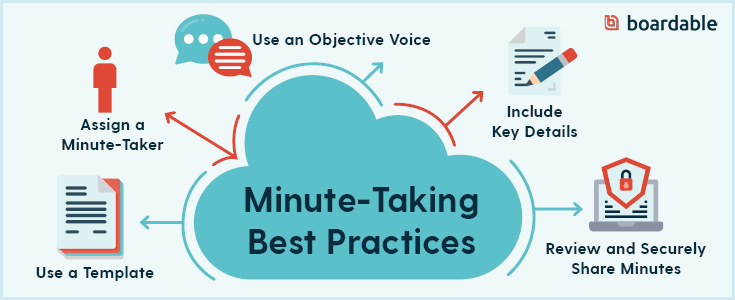
These are several easy-to-implement best practices for taking effective board meeting minutes.

1. Use Your Agenda as a board meeting minutes template.

As with most meetings, planning ahead is critical to create a defined outline that will lead your board meeting in effective conversation. If board administration creates a board meeting minutes template that’s blended with the agenda, taking minutes becomes incredibly straightforward and much less prone to error.

Many board secretaries or administrative staff create a note-taking outline a few days before the meeting. Consider using the meeting agenda as a guideline, and outline important issues that will be covered. This outline gives you a predefined structure to follow, so you can spend more time listening and accurately capturing the conversation, rather than trying to start from scratch and record everything on the fly.

2. Assign a Minute-Taker in Advance.

Putting a board member on the spot could come as a very unpleasant surprise. In fact, this will certainly compromise the quality of that board member’s engagement and participation levels and could even go as far as to compromise the quality of the meeting minutes. Because of this, you’ll want to choose a minute-taker in advance.

Have the same person take minutes at every meeting and designate a backup person to take them for when that regular minute-taker is unable to attend. This allows these individuals to familiarize themselves with the process and will ultimately lead to stronger, clearer board minutes. Typically, the designated minute-taker is the board’s secretary.

After appointing the task to someone, you’ll want to make expectations crystal clear. This includes:

  1. What format should be used – Is there a particular format that your minute-taker should mimic? The exact format used varies by the organization, although best practices for governance indicate that all should include some basic information, such as essential details regarding motions and voting. Using past board minutes as a template can be an effective option, and a minutes maker tool will streamline this process further.
  2. Whether or not they should participate in the discussion – Is your minute-taker a board member? If not, they should NOT participate in any discussion unless expressly invited to do so. A case in which they’re invited to participate may be when the board wishes to hear a non-board member’s perspective on an issue.
  3. How they should take minutes – Technology can streamline the process of taking accurate minutes but only if the minute-taker knows how to operate the board minutes system. During the meeting is not the optimal time for learning how to use these tools, so be sure your minute-taker undergoes training to become familiar with them beforehand.

2. Write in an Objective Voice.

One of the most important aspects for your board secretary to remember is that board meeting minutes must be written objectively. When you encounter controversial issues or contentious votes, attempt to summarize the debates and arguments. Weed out all the emotion by following these suggestions:

  • Stick to the facts, including votes in favor of a motion, votes against a motion, abstentions, and pertinent details about discussions. Listen carefully to the main topics and simply document significant portions of the discussion.

  • Ask a third party — someone who is not on the board— to read the board minutes to give you an unbiased opinion. When doing so, make sure the third party is not privy to any confidential information.

  • Return to them the next day. Since the secretary is also a voting board member, recording information objectively can be challenging. If you’re unsure if your board minutes are objective, sleep on it and re-read them the next day with a fresh mind.

By following these tips to ensure objectivity, you’ll create unbiased notes that capture essential information for future reference.

3. Include Pertinent Details.

Board meeting minutes are a matter of law for nonprofits. They serve as the official record to show that the meeting was actually held and important matters were discussed, and as such, it’s always important to capture all necessary details.

While there are no legal rules for what information board meeting minutes must include, most boards base their outlines on Robert’s Rules of Order. Full use of these rules would be cumbersome for most nonprofits, but limited use can be helpful in maintaining order and quickly addressing agenda items. When following Robert’s Rules of Order, board minutes must include:

  • The type of meeting.
  • The date, time, and location of the meeting.
  • A list of attendees, including nonvoting participants with their names, titles, and reasons for attending.
  • When the meeting was called to order and when it was adjourned.
  • A record of motions, seconds, and whether or not the motion passed.

Overall, aim to create board meeting minutes that are specific enough to capture the board’s focus and decisions, but not so sparse that you can’t decipher what actually occurred during the meeting a few months down the line. Plus, scant board minutes could open up the board up to liability issues, so you never want them to be so minimal that they raise suspicions.

Think of it this way: major decisions and discussion points should always be captured but in a “short and sweet” fashion.

4. Proofread and Share Minutes Securely.

When all is said and done, you’ll want to review your board meeting minutes before sharing them. Be sure they’re consistently formatted and presented. If there are side notes that need to be rewritten into the minutes, see to it promptly after the meeting.

From here, board minutes should be finalized and distributed to attendees as soon as possible while the meeting is still fresh in the board and minute taker’s memory. A secure platform will allow board members to readily open board meeting minutes, the agenda, and any other pertinent documents.

There are quite a few details you should exclude from your board meeting minutes. Let's walk through them.

3. What Not to Include in Board Meeting Minutes

Knowing what to leave out of board meeting minutes is just as significant as knowing what to include. With this in mind, let’s explore five things nonprofit boards commonly record but shouldn’t.
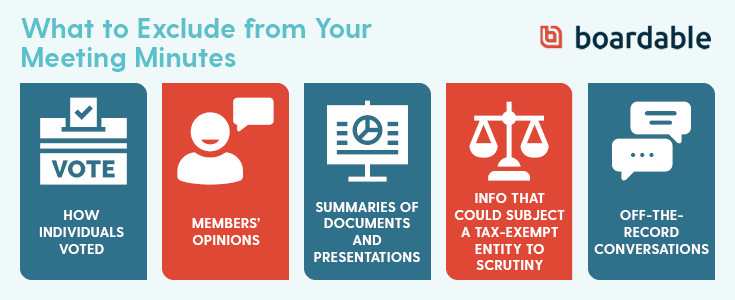
These are a handful of things you shouldn't put in your board meeting minutes.

1. Don’t Include How Individuals Voted.

In each of your board meetings, you’ll likely have a handful of items that need to be voted on. While you should name who made and seconded the motion, you shouldn’t include how individuals voted. Exclude their names and simply note the number of those in favor, those against, and those who abstained. As a general rule, keep the record impersonal.

However, there is an exception to this rule. If financial transactions involving board members come up or if the executive pay is set, let the board meeting minutes reflect how individuals voted and their rationales. In the event of any legal challenges, rationales will support reasonability.

2. Don’t Include Particular Board Members’ Opinions.

As previously mentioned, your board meeting minutes should be unbiased. Because of this, board minutes should focus on decisions, not discussion.

On occasion, disagreeing members may state flat-out that they want their disagreement recorded. Avoid this, and instead, simply note that it occurred — no further explanation necessary.

Similarly, if there was a debate, mention it, but don’t make opinionated notations. After all, board meeting minutes are discoverable papers that can be used in any potential legal situation.

3. Don’t Include Summaries of Documents or Presentations.

You should mention presented materials in your board minutes. However, don’t go into great detail about its content. Instead, note where it’s obtainable, so members don’t have to rifle through excess information in the minutes itself.

With comprehensive tools, presentations are easy to locate at any point. Specifically with solutions like Boardable’s Document Center, you can organize and store pertinent records, presentations, and other documents alongside your board meeting minutes.

Plus, Boardable is compatible with Dropbox and other widely-used cloud-based storage systems, making it easily accessible to all board members.

4. Don’t Include Things that Could Subject a Tax-Exempt Entity to Scrutiny.

While there are common distractions in every board meeting, recording them can be problematic in a legal investigation. You’ll want to exclude these distractions. For example, leave out:

  • Praise or displeasure.
  • Small talk or political banter.
  • Negative spin.
  • Unnecessary legal terms.

When in doubt, simply leave it out. That goes for anything that could present complications if reviewed later by others. If legal commentary was made or if the nonprofit’s lawyer advised the board, simply note that this occurred in the board minutes. Further, don’t record the substance of the legal advice.

5. Don’t Include Off-The-Record Conversations.

Side discussions are bound to happen, but they shouldn’t be recorded. These off-the-record comments and discussions are certainly allowed to take place, but they must be clearly designated as off-the-record. If a board member brings up an issue that’s worth clarifying but doesn’t appear in the agenda, it doesn’t normally need to be detailed.

Instead, note that directors took the time to discuss items that weren’t on the agenda. Nothing else should be recorded about any tangents.

To avoid these complications, create an Agenda Requests folder in your Document Center. This way, future discussion topics are correctly scheduled into future meetings.

Let's explore a board meeting minutes template that your team can use.

While the content of your nonprofit board minutes will change from one meeting to the next, following a standard outline will help in the minute-taking process to ensure consistency and accuracy. There’s no “right way” to draft meeting minutes, and each organization has its own preferences for what effective ones look like. However, there are several details every nonprofit board needs to record during meetings.

If you’re new to the process, you’re likely unfamiliar with these components, and you may be unsure of where to start when creating a reusable outline. To help, we’ve created a board meeting minutes template that you can use in your own operations based on Robert’s Rules of Order.
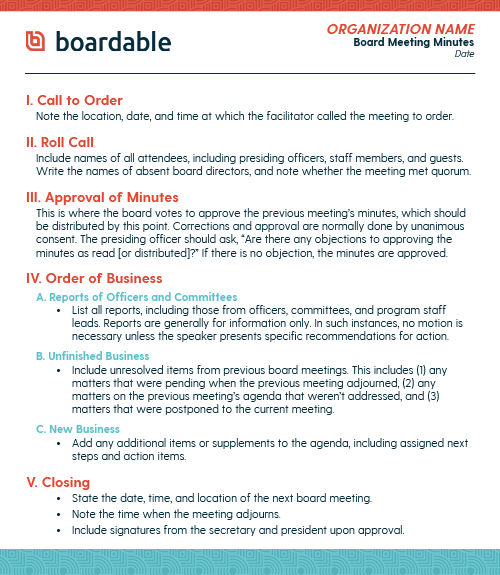
For your next meeting, use this board meeting minutes template as a guide.

If you’re unable to view the above board meeting minutes template, we’ll break it down into five key steps:

1. Opening the meeting, where you include the date and time the meeting started, take attendance, and vote on the approval of the previous meeting’s minutes

2. Reports from officers, standing committees, and any special committees

3. Old business, where you discuss unresolved issues from previous meetings

4. New business, where you discuss any other agenda items that come up

5. Closing the meeting, where you include the date and time of adjournment

While the above board meeting minutes template will serve as a solid starting point, you’ll need to customize it to suit your board’s exact needs. With an outline to go off of, you’ll set your team up for success and ensure all important discussions and motions are recorded in a cohesive, clear, and consistent way from meeting to meeting.

While creating a template manually may work, it’s not optimal. Luckily, current technology offers several options when it comes to accurately recording a meeting with board meeting minutes templates. For instance, Boardable offers tools that enable you to record minutes directly within your agendas, an option which we’ll discuss in-depth below.

Let's walk through several ways dedicated tools can help you take more effective board minutes.

5. How Board Minutes Tools Can Help

As you now know, taking board minutes requires substantial work and unwavering attention to catch all the pertinent details. Just like most of your day-to-day tasks, this process can be streamlined with the right technology.

By solidifying your digital strategy and investing in dedicated tools to take notes, it’s even possible to have completed, ready-to-distribute board minutes for everyone just minutes after the meeting wraps up.

For those looking to improve their board meeting minutes and simplify the process altogether, Boardable’s Minutes Maker tool is a great option!

With our dedicated tools, you can take minutes using the agenda you’ve already built to ensure you don’t miss a single detail. Simply pull up your agenda and quickly enter notes, assign tasks, and record votes. From here, any tasks will appear on the assigned individual’s dashboard as a reminder. Take a look at how simple recording notes and assigning tasks is:
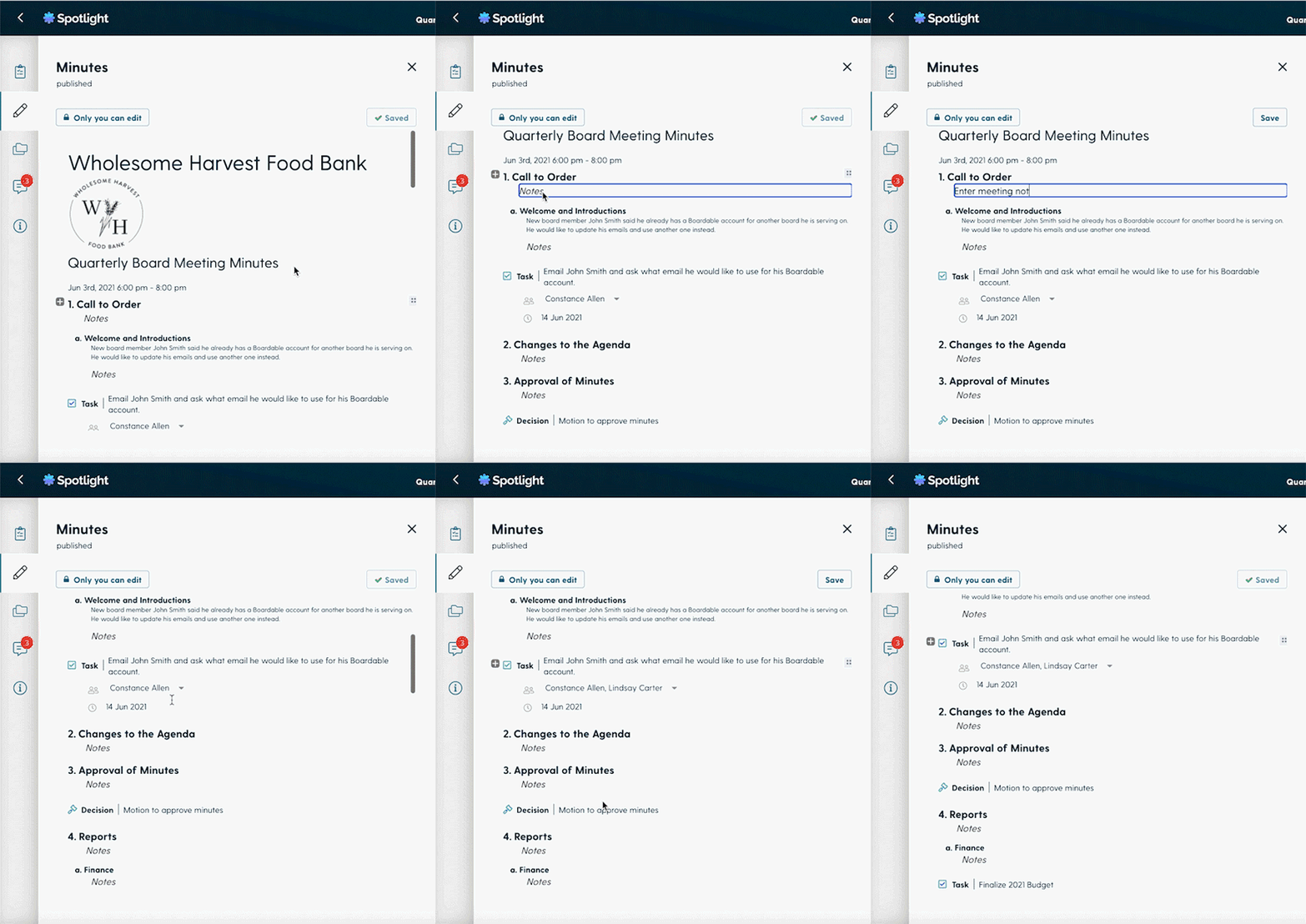
Boardable makes taking effective board meeting minutes a breeze.

Plus, sharing your board minutes has never been easier! Once you’ve finalized them and gotten them signed off on using our e-signing tools, publish them and instantly distribute them to your desired audience. You can choose to make meeting minutes public if desired, and they’re always associated with the meeting and its attendees. You can choose to save a record in your Document Center or email a PDF, keeping everyone updated.

Best of all, you can connect the minutes, agenda, and tasks of a past meeting with the materials for the next one, which makes approval, review, and preparation for upcoming discussions a breeze! Take a look at how simple it is to group meeting information together:
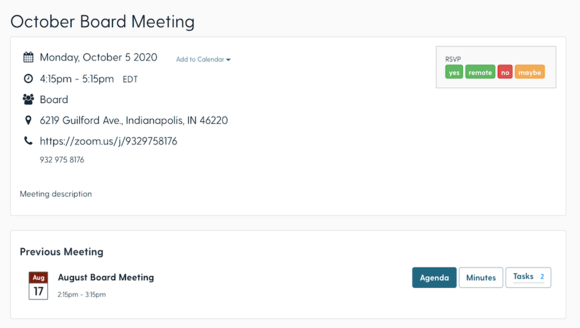
Boardable makes connecting your board meeting minutes, agenda, and tasks of a past meeting with the next one a breeze.

Using dedicated tools can help protect your board from liability and inefficiency by ensuring you catch all vital details. Let Boardable do the heavy-lifting, so you can focus on producing effective notes that capture the essence of your meeting.


Wrapping Up

From documenting discussions to important votes to follow-up assignments, there’s a lot that goes into board meeting minutes. To recap, they’re more than a general account of your board’s conversations and actions. They serve as a reference point for future discussions, inform those who were unable to attend, and serve as an official and legal record of your meetings, so the job shouldn’t be taken lightly.

If you’re unsure where to start when documenting your next meeting, feel free to build out your minutes using the above board meeting minutes template. For a more tailored approach, our powerful board software and intuitive Minutes Maker tool will streamline the process further, ensuring you capture all essential discussion points.

To help you continue your research on effective board operations, we’ve compiled a list of resources that we thought you might find useful. Explore each of these pages to expand your knowledge, so you’ll understand how to instill a spirit of collaboration and efficiency throughout your nonprofit:

If you’re tired of preparing agendas, budgets, reports, minutes, and all the documents that go into a board book, how about you… BLOW IT UP?

Why It's Time to Blow Up the Board Book ebook download from Boardable

Learn all about how to get rid of the traditional paper board book in this free ebook download. Share the PDF with your team and never create another cumbersome board book again!

Create a free account now to see how Boardable's tools can help you take more effective board meeting minutes.


Sunday, June 6, 2021

How to Form a California Nonprofit Corporation | Nolo

How to Form a California Nonprofit Corporation | Nolo

nolo.com

How to Form a California Nonprofit Corporation

Nolo

Start a California 501(c)(3) nonprofit corporation by following these steps.

Most nonprofits are 501(c)(3) organizations, which means they are formed for religious, charitable, scientific, literary, or educational purposes and are eligible for federal and state tax exemptions. To create a 501(c)(3) tax-exempt organization, first you need to form a California nonprofit corporation. Then you apply for tax-exempt status from the IRS and the state of California. Here are the steps to create a nonprofit in California.

  1. Choose the initial directors for your corporation.
  2. Choose a name for your California nonprofit corporation.
  3. Prepare and file your nonprofit articles of incorporation.
  4. Prepare bylaws for your California nonprofit corporation.
  5. Hold a meeting of your board of directors.
  6. Set up a corporate records binder.
  7. File your Form 1023 federal tax exemption application.
  8. Obtain your California state tax exemptions.
  9. Other state reporting and registration requirements.

Form Your California Nonprofit Corporation

To form a nonprofit in California, first you need to form a nonprofit corporation under California state law (California Corporations Code Section 5000 et. seq.).

1. Choose the initial directors for your corporation

In California, you must have at least one director on your board.

2. Choose a name for your California nonprofit corporation

The name of your nonprofit corporation cannot be the same as or too similar to an existing corporation name on record with the California Secretary of State. To see if your proposed name is available, you can check the Business Search database on the Secretary of State's website. This is not an official name availability check. To do that, mail a Name Availability Inquiry Letter to the Secretary of State's office. You can reserve a name for 60 days by filing a Name Reservation Request Form which will prevent another corporation from registering the name while you prepare and file your articles.

See Cal. Corp. Code §5122 for more information on name restrictions for nonprofits.

3. Prepare and file your nonprofit articles of incorporation

You create your nonprofit entity by filing articles of incorporation for a nonprofit with the California Secretary of State. Your articles of incorporation must include basic information such as:

  • the name of your nonprofit
  • the following statement:

"This corporation is a nonprofit public benefit corporation and is not organized for the private gain of any person. It is organized under the Nonprofit Public Benefit Corporation Law for (public or charitable [insert one or both]) purposes."

  • the name and street address in California of the corporation's initial agent for service of process
  • the initial street address of the corporation
  • the initial mailing address of the corporation, if different from the initial street address.

The California Secretary of State has a nonprofit articles of incorporation form on its website for 501(c)(3) Nonprofit Public Benefit Corporations (Form ARTS-PB-501(c)(3)). Use this form to create your charitable or public purpose 501(c)(3) nonprofit corporation. Complete and file your articles following the instructions provided. You can create your own articles or use the fillable articles form on the website. Whether you create your own articles or use the fillable version, you will need to file your articles with the Secretary of State by mail with the appropriate filing fee. There is no online filing option.

To receive tax-exempt status from the IRS and the state of California, you'll need to have certain specific language in your articles, including:

  • a statement of purpose that meets IRS requirements
  • statements that your non-profit will not engage in prohibited political or legislative activity, and
  • a dissolution of assets provision dedicating your assets to another 501(c)(3) organization upon dissolution.

The articles form on the California Secretary of State's website contains the tax-exempt language required by the IRS and the state of California. For more information on IRS requirements for tax exemption, including sample language, see IRS Publication 557, Tax-Exempt Status for Your Organization, available on the IRS website. Make sure you include the required tax-exempt language in the articles you create.

4. Prepare bylaws for your California nonprofit corporation

Before you file your articles of incorporation, you'll need to have bylaws that comply with California law. Your bylaws contain the rules and procedures your corporation will follow for holding meetings, electing officers and directors, and taking care of other corporate formalities required in California. Your bylaws do not need to be filed with the state -- they are your internal operating manual. For more information and sample bylaws for a California nonprofit, see How to Form a Nonprofit Corporation in California, by Anthony Mancuso (Nolo).

5. Hold a meeting of your board of directors

Your first board meeting is usually referred to as the organizational meeting of the board. The board should take such actions as:

  • approving the bylaws
  • electing directors (if not named in your articles)
  • appointing officers
  • setting an accounting period and tax year, and
  • approving initial transactions of the corporation, such as the opening of a corporate bank account.

After the meeting is completed, be sure to create minutes that accurately record the actions taken by the board.

6. Set up a corporate records binder

You should set up a corporate records binder for your nonprofit to hold important documents such as articles of incorporation, bylaws, and minutes of meetings. For more information, as well as minutes forms, consent forms, and other resolutions, see Nonprofit Meetings, Minutes & Records, by Anthony Mancuso (Nolo).

Obtain Your Federal and State Tax Exemptions

Now that you have created your nonprofit corporation, you can obtain your federal and California state tax exemptions. Here are the steps you must take to obtain your tax-exempt status:

7. File your Form 1023 federal tax exemption application

To obtain federal tax-exempt status from the IRS, you will need to complete and file IRS Form 1023, Application for Recognition of Exemption Under Section 501(c)(3) of the Internal Revenue Code. This long and detailed form asks for lots of information about your organization, including its history, finances, organizational structure, governance policies, operations, activities, and more. For line-by-line instructions on how to complete the Form 1023, see How to Form a Nonprofit Corporation, by Anthony Mancuso (Nolo).

Smaller nonprofits may be eligible to file Form 1023-EZ, Streamlined Application for Recognition of Exemption under Section 501(c)(3) of the Internal Revenue Code. This is a much simpler, shorter form that is filed online. Only smaller nonprofits--those with projected annual gross receipts of less than $50,000 and total assets of less than $250,000--are eligible to use the streamlined 1023-EZ application.

See the IRS website for more information on the Form 1023 and Form 1023-EZ filing requirements.

8. Obtain your California state tax exemptions

Once you have your federal tax exemption, you can obtain your California state tax exemption. This may include exemptions from income, property, sales, and other state taxes. The website for California's tax agency, the Franchise Tax Board, will have the form you need to file to obtain your state tax exemption, FTB 3500A, Submission of Exemption Request.

9. Other state reporting and registration requirements

Depending on your activities and the size of your organization, you may need to register with the state before doing any fundraising activities. The Office of the Attorney General, Registry of Charitable Trusts division, has information and forms about fundraising and registration requirements for nonprofits in California.


Nonprofit Bylaws | Sample Nonprofit Bylaws | Nolo

Nonprofit Bylaws | Sample Nonprofit Bylaws | Nolo

nolo.com

Nonprofit Bylaws

Christine Mathias, Attorney

A nonprofit's bylaws provide the rules and procedures for running the organization.

When you create a nonprofit, one of your most important steps will be to draft the organization's bylaws, which establish the internal rules for operating the organization. The board of directors, tasked with setting policies and overseeing the nonprofit, will follow the rules and procedures outlined in the bylaws. Some states require nonprofits to have bylaws, but it's a good idea to have them even where not required. Bylaws can help directors run your organization, resolve conflicts among directors, and demonstrate to the public and the IRS that your organization is responsibly managing donations to further the nonprofit's charitable mission.

What to Include in Your Bylaws

Your bylaws will provide basic information about your organization and the rules that will govern your board of directors. Although the law does not require nonprofits to include any specific provisions, you should address the following to give your board adequate guidance to run the organization:

  • the official name of your nonprofit
  • the organization's principal address (the location where you will store your corporate records)
  • the organization's purpose (more below)
  • an outline of the board structure (minimum and maximum number of directors)
  • a list of your officers (such as the president, vice president, secretary, and treasurer) and a description of what each will do
  • your procedure for adding and removing board members (including qualifications to serve on the board)
  • any term limits for board members
  • your schedule for regular and annual board meetings
  • details on giving notice of board meetings (how many days before the meeting, and method of communication)
  • your rule on quorum requirements (how many board members must be present to make a decision)
  • a list and description of board committees (smaller groups within the board to address issues such as fundraising or operations )
  • the date that will be the end of your fiscal year (the last month of your budgeting cycle)
  • your rules for amendments (how can you change the bylaws), and
  • how you will handle the dissolution of your nonprofit (when and how you can close the nonprofit).

Review your state's nonprofit laws to make sure your bylaws are in compliance. For instance, many states require nonprofits to have a minimum of three directors, as well as a president, secretary, and treasurer. When your bylaws do not address an issue that is addressed by state law, your nonprofit must follow the laws of your state. For example, your state might provide that directors serve for terms of one year unless the bylaws provide otherwise. If your bylaws are silent on the matter of terms, by default your directors will have one-year terms; but if you wish, you can use the bylaws to set a different term.

Additional Considerations for 501(c)(3) Nonprofits

Many nonprofits pursue 501(c)(3) tax-exempt status, which allows organizations to avoid certain corporate, sales, and property taxes. Tax-exempt status is granted by the IRS, which does not directly require nonprofits to include specific provisions in their bylaws. However, when you apply for tax exemption, the IRS will look at your bylaws to determine if your nonprofit meets the legal requirements for exemption. By addressing the following provisions in your bylaws, you will increase your organization's likelihood of gaining 501(c)(3) status:

  • The nonprofit's purpose: Here you can show that your organization's purpose meets the requirements for 501(c)(3) status. Your organization's purpose must be charitable, religious, educational, scientific, literary, for public safety testing, related to amateur sports competitions, or for the prevention of cruelty to children or animals.
  • Conflict of interest policy: An exempt organization cannot provide a private benefit to an individual, including business dealings with board members. Your bylaws should have a policy that addresses potential conflicts, by requiring directors to disclose interests and abstain from voting on matters they could personally benefit from.
  • Compensation policy for board members: Exempt nonprofits cannot pay directors more than a reasonable amount for their time and efforts, and many nonprofits have a policy stating directors will serve without compensation.
  • Documents retention and destruction policy: Exempt nonprofits must maintain corporate records and meeting minutes, and after a specified period of time (which differs depending on the document), the directors should destroy the records. Your bylaws should set out your procedures for retention and destruction.
  • Public disclosure of exemption application and annual tax returns: An exempt organization's tax filings, including the exempt application and annual returns, must be available for public inspection and copying.
  • Limitations on activities: Exempt nonprofits cannot engage in political activity or substantial lobbying (read more about the restrictions here), and you can include this limitation in your bylaws.

What Not to Include In Your Bylaws

Your bylaws should address only basic information about your organization and an overview of board procedures, and not the specifics of your day-to-day operations. Do not include rules that will be difficult for your board to follow (which they'll want to change) or procedures that will change frequently, because changing bylaws isn't simple—you must follow legal rules to amend your bylaws (as discussed below). For example, instead of stating the time and address of your board meetings, you can simply state that your board will meet once a month at an agreed-upon location. You might include general descriptions of officer positions that will stay the same throughout the life of the nonprofit, but avoid listing employee positions, which are likely to change.

How and When to Update Bylaws

Make plans to review your bylaws regularly. Review the document whenever the nonprofit undergoes a major change, like moving the organization to a new state or merging with another nonprofit. Also plan to review your bylaws annually, both to make sure you are following them and to update provisions as necessary. To make amendments, follow the rules outlined in your bylaws, which should provide the number of director votes you need to make amendments (if your bylaws do not provide guidance, check with your state's laws). Record the results of the vote in your meeting minutes.

If your nonprofit has tax-exempt status and you make a "structural or operational" change to your organization, such as changing the name or purpose, you must inform the IRS. For smaller changes, like changing director term limits, you do not need to inform the IRS. You can report some changes on your annual tax return, while the IRS requires you to report other changes on different forms. Check with the IRS for details.

How to Draft Nonprofit Bylaws

Your organization's current board of directors will draft and approve the bylaws. Nonprofits often draft bylaws before or shortly after filing formation documents with the state. However, you can create bylaws any time after formation. You can even create your bylaws with Nolo's online form.

Your state laws specify which officers must sign the bylaws, such as the secretary or the president. Unlike other organizational documents, like the articles of incorporation, you do not file bylaws with the state. You must keep them with your nonprofit's records, and ensure they are accessible to board members.

Sample Bylaws

To get you started on your draft, check out the following sample bylaws.

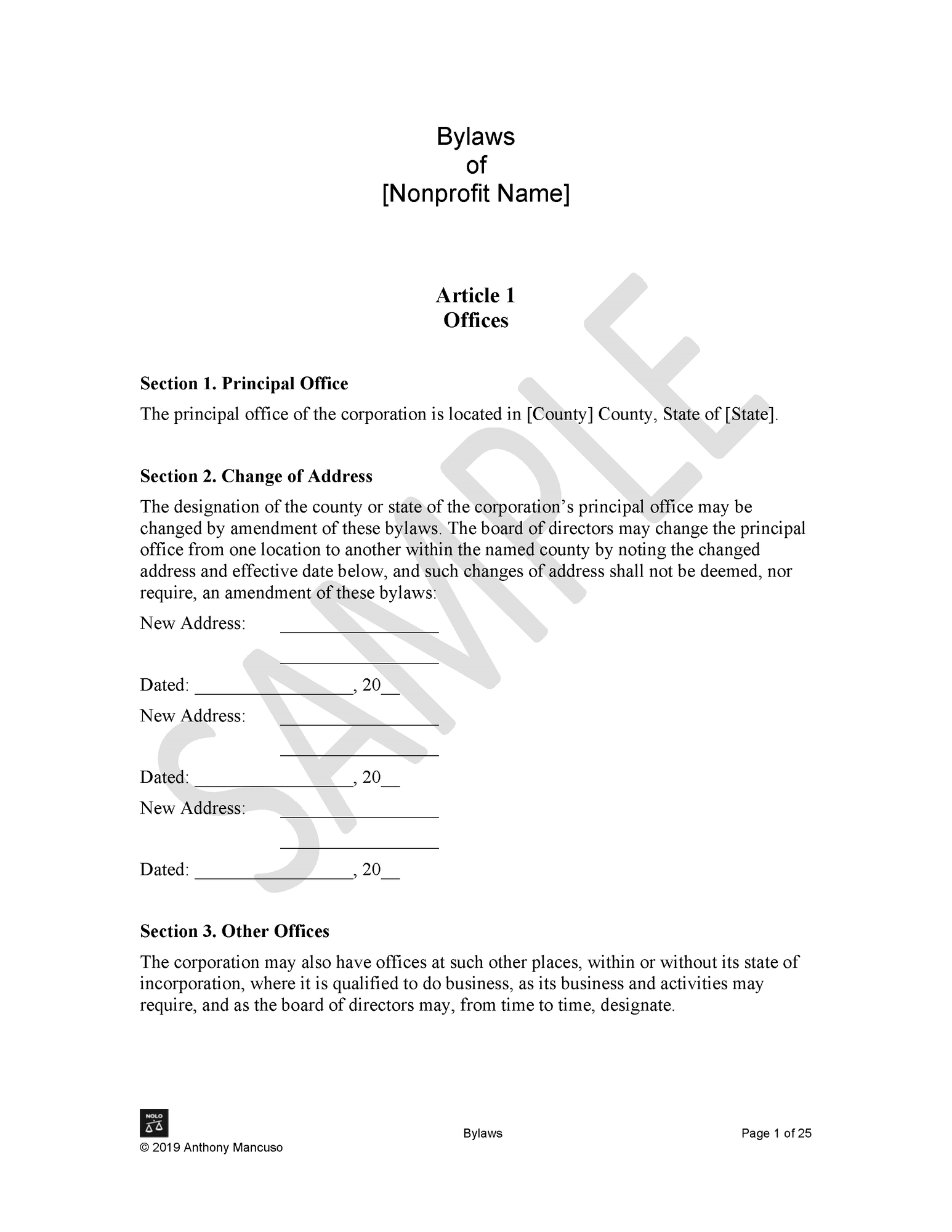
Sample nonprofit bylaws